Avast Cleanup – Phone Cleaner
ToolsAbout This App
- ◫NameAvast Cleanup – Phone Cleaner
- ≡CategoryTools
- ◆Price0
- ✓Safety100% Safe
- ↗DeveloperSolidDevsKit
- ○Version1.8.1

Description
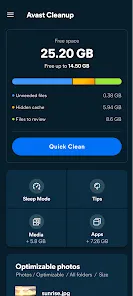
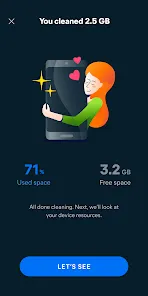
Avast Cleanup is a powerful phone cleaner and storage manager designed to help you remove junk files and perform deep cleaning on your Android device for an organized experience. With advanced cleaning tools and smart cleaning technology, Avast Cleanup turns your device into a cleaner phone. Whether you need to clean your phone, manage storage space, remove junk, or identify what drains your battery, Avast Cleanup delivers a complete cleaning experience.
Go beyond simple storage management by identifying hidden, unnecessary files that slow down your device. Our advanced cleaning technology detects leftover data and temporary files from uninstalled apps that occupy valuable storage. By removing these digital leftovers, you get more than a better organized phone — you reclaim space for new photos, videos, and important applications.
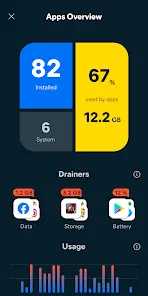
Get more from your device with our intelligent cleaning features. Avast Cleanup doesn't just delete files; App Analyzer helps you identify apps that are active in the background, so you can manage them more easily.
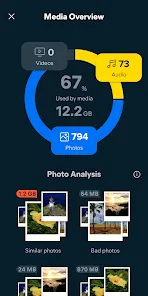
Organize your media and gallery with our smart photo cleaning feature. We help you identify blurry, poor-quality, or duplicate photos. From managing large files to organizing your downloads, Avast Cleanup is the all-in-one app to keep your phone clean.
Avast Cleanup Features
Clean and Remove
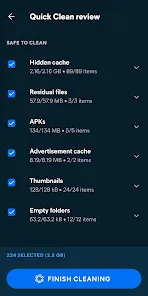
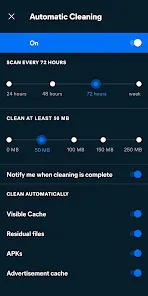
• Remove unnecessary files and safely clean junk.
• Clean junk files, browser history, download folders, leftover data, and more.
Reclaim Storage Space
• Analyze storage space.
• Quickly and easily uninstall multiple unwanted apps in one go.
• Clear junk, including old and residual files.
Analyze App Impact
• Determine the impact of individual apps on your device.
• Check which apps consume your data.
• Find apps draining your battery.
• Discover unused apps with Apps Overview.
Clean your photo library
• Find and remove similar, old, and poor-quality (dark or blurry) images.
• Use the photo adjuster feature to reduce photo sizes with Low, Moderate, High, and Aggressive file compression
• Delete photos from private chats
Monitor system resources
• Learn how your CPU (processor), RAM, and storage are used so you can quickly spot issues and keep your device running smoothly.
Easy to Use
• Clean your Android with our Quick Clean
• Simple, intuitive user interface which is easy to navigate.
Summary
► App Analyzer: Identify apps draining resources and easily clean up with Avast Cleanup.
► App Remover: Quickly clear out unused apps to increase storage space.
► Junk Cleaner: Master the cleanup of junk files and residual app and browser data.
► Analyze apps based on storage, battery use, and data consumption to decide what to clear or clean up.
► Detect and remove duplicate photos for effective cleaning.
► Easily clean up your photo library and clear unnecessary files.
► With one tap, clean your phone, perform a full cleanup, and clear junk files in seconds.
► Organize photos easily.
By installing this app, you agree that your use of it is governed by these terms: https://www.avast.com/en-ph/cybersec-event-terms.
Avast Cleanup uses accessibility permission to assist disabled and other users stop background apps with just one tap.
Download Avast Cleanup – the smart, powerful phone cleaner and cleaner app to keep your Android device tidy by removing junk, managing storage, and completing thorough cleanup today.
Frequently asked questions
01How do I install this app after downloading it?
If you're an Android user and don't download the app from the official Google Play Store, you may find the installation process more complicated than usual.
02Is this app safe to use?
We fully understand your concern about safety. We agree that one person wouldn't be too careful in the cyber world. Meanwhile, we are happy to tell you that one of our priorities is to provide our users with safe app files that they can use without any worries. We guarantee that all the app files we provide originate from official and reliable sources. We promise that they do not contain any malware that will harm your hardware or the safety of your privacy.
03Is this app free to download?
We are happy to inform you that the answer is an absolute YES! All the apps on our website are 100% free to download. Besides, you do not have to create an account. Just click on the download button, and it's done.
04How do I find my account back?
Recently we received a lot of emails from our users saying they couldn't log in for different reasons, such as "forgot the user name or password" or "had a new phone." We are willing to help you out. To answer this question, please first let us know which account you're referring to. If you're referring to your account of some app, like your Facebook account or your Youtube account, unfortunately we would not be able to help in this case. We would suggest you turn to the customer service of this application.
05How do I cancel subscriptions?
This question is essentially quite similar to the prior one. It's a pity that we are unable to help you cancel the subscription to a third-party application directly, while we would suggest you contact its customer service for further information.
06How do I get a refund?
Sorry that we are unable to help you get a refund from a third-party application directly. If you wish to get a refund from a third-party app, we would suggest you contact its customer service. If you run into any site that asks you to provide your payment information, be careful. Remember never to reveal your payment information to any unauthorized third parties.
07How to use this app?
Sorry that we cannot answer this question directly, as this section only aims to answer some general questions. You may find how to use a certain app by checking our review page.